Close more deals.
Say the right thing, every time.
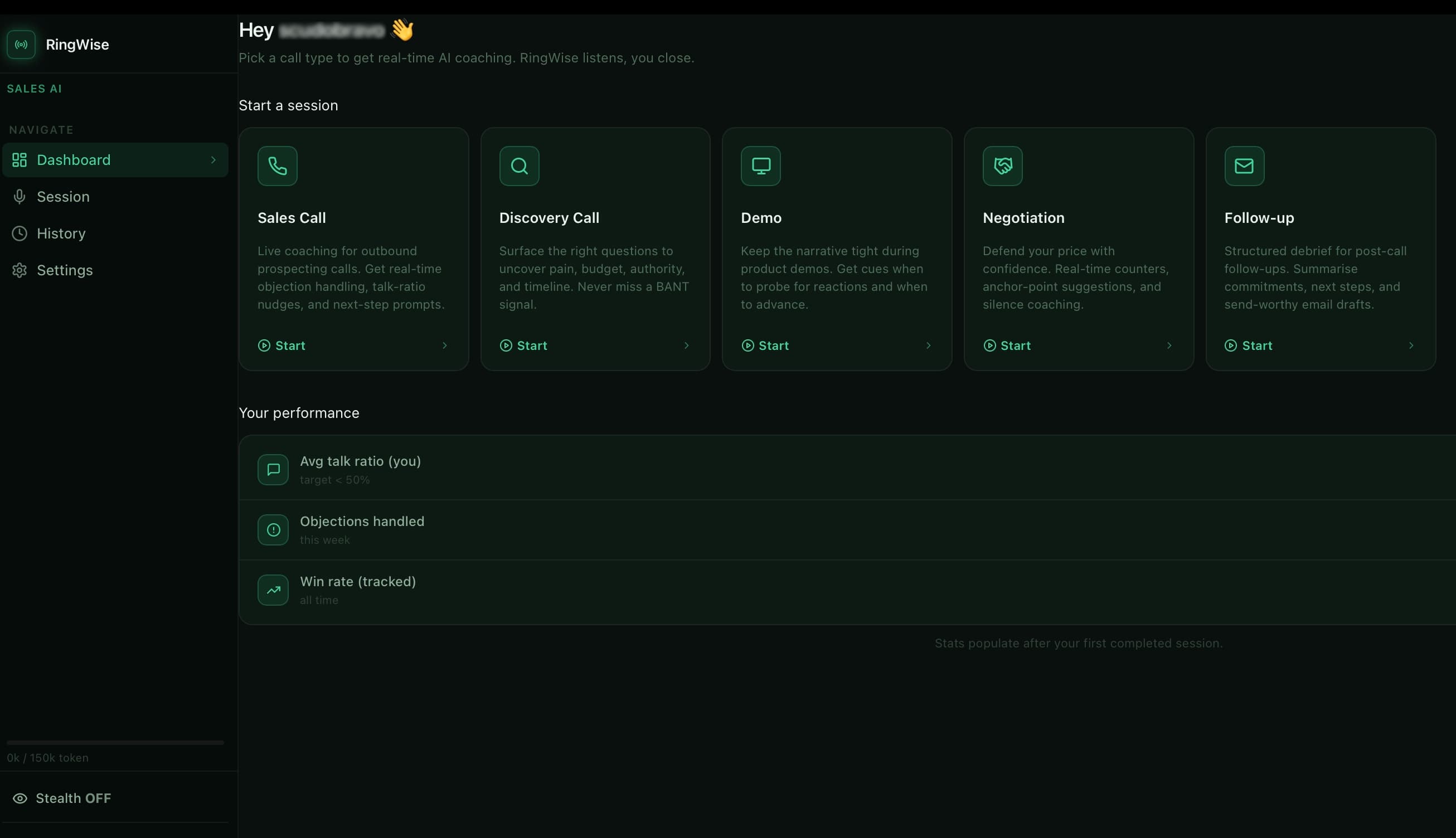
RingWise listens to your sales calls and surfaces real-time AI coaching — invisible to your prospect, always one step ahead.
"They mentioned budget. Emphasize the 3.5x ROI our current B2B partners see in year one."
"Now is the time to ask: 'What's the process for getting this signed by Friday?'"
Engineered for
High Performance.
Real-time transcription
Captures every word across Zoom, Teams, Meet and Webex — no browser extension needed.
Instant AI cues
Context-aware suggestions appear on your screen exactly when you need them, in under a second.
Talk ratio monitor
Know when you're talking too much. Stay in the green zone and let the prospect speak.
Stealth mode
Invisible to screen sharing and recording tools. No bot joins the call. No notification sent.
Objection bank
Feed RingWise your playbook once. It learns your best reps' responses and scales them to the team.
5 call modes
Sales Call, Discovery, Demo, Negotiation, Follow-up — each with its own AI coaching profile.
Set up in seconds.
Zero complex integrations. It just works.
Download the app
Install RingWise on Mac or PC. No browser extension, no CRM plugin required.
Start a call
Open Zoom, Teams or Meet. RingWise detects audio automatically.
Get live cues
AI tips appear on your screen as you talk, invisible to everyone else.
Your secret weapon.
Literally.
Unlike other AI sales tools, RingWise announces nothing. No recording notification, no participant named 'RingWise AI', no meeting bot number with your prospect. It's a layer of intelligence that sits directly on your screen.
- check_circleLocal-first privacy encryption
- check_circleNo meeting bot injection
- check_circleCompatible with all VoIP providers
Simple, transparent pricing.
Invest in your sales trajectory.
Pro
Unlimited usage · 1 user
- doneUnlimited usage
- doneReal-time AI coaching during calls
- doneAI-generated follow-up email
- doneSession history and scorecards
- doneStealth mode
- donePriority support
Team
Up to 5 users · EUR 13.80/user
- doneEverything in Pro
- done5 included seats
- doneTeam analytics dashboard
- doneCustom AI prompts
- doneDedicated onboarding
Cancel anytime · No contract · Secure billing via Stripe
Frequently asked questions
How does RingWise work during a call?expand_more
RingWise listens to your microphone and speaker audio locally on your computer. The AI analyzes the transcript in real time and shows contextual suggestions right on your screen — invisible to the person you're talking to.
Can my prospect tell I'm using RingWise?expand_more
No. RingWise doesn't join the call as a participant, doesn't send recording notifications, and doesn't use VoIP numbers. It runs only on your local device.
Does it work with Zoom, Teams, and Google Meet?expand_more
Yes. RingWise works with Zoom, Microsoft Teams, Google Meet, Webex, and any other platform that uses your system microphone.
Do I need to install browser extensions?expand_more
No. RingWise is a native desktop app for macOS and Windows. No plugins, no extensions, and no CRM integration required.
Is my data secure?expand_more
Transcription happens locally on your device. AI requests use encrypted connections. We don't sell or share your data with third parties.
Can I cancel my subscription anytime?expand_more
Yes. You can cancel anytime from your personal dashboard. You'll keep access to your paid plan until the end of the period you've already paid for.
What happens if I hit my monthly session limit?expand_more
The app shows a real-time usage bar. When you reach the limit, you can upgrade to the next plan or wait for the automatic reset at the start of the month.
Is there a free trial?expand_more
Yes. The Free plan is free forever with ~50 sessions per month. No credit card required to get started.
Your next deal is already on the line.
Join 5,000+ top-performing account executives using RingWise.